

The series of articles on programming on the Solana blockchain continues! My voting application has been finished for a while now, and I’m slowly moving forward!
Imagine reading a post on X (Twitter) and wanting to donate 0.1 SOL to your favorite creator. Instead of copying their address, opening your wallet, setting up the transaction, and waiting – you just click a button directly within the post. Those are Blinks (Blockchain Links).
What Are Blinks, Exactly?
To use a simple analogy: if traditional blockchain is like going to the bank to fill out a transfer slip, a Blink is like a QR code on a cafe bill. Everything is already prepared; you just need to approve it.
How Does It Work Under the Hood?
Blinks rely on Solana Actions. These are API endpoints that return a transaction for the user to sign. When a wallet (like Phantom or Backpack) recognizes a special URL, it “unpacks” it and displays a nice button instead of a plain link.
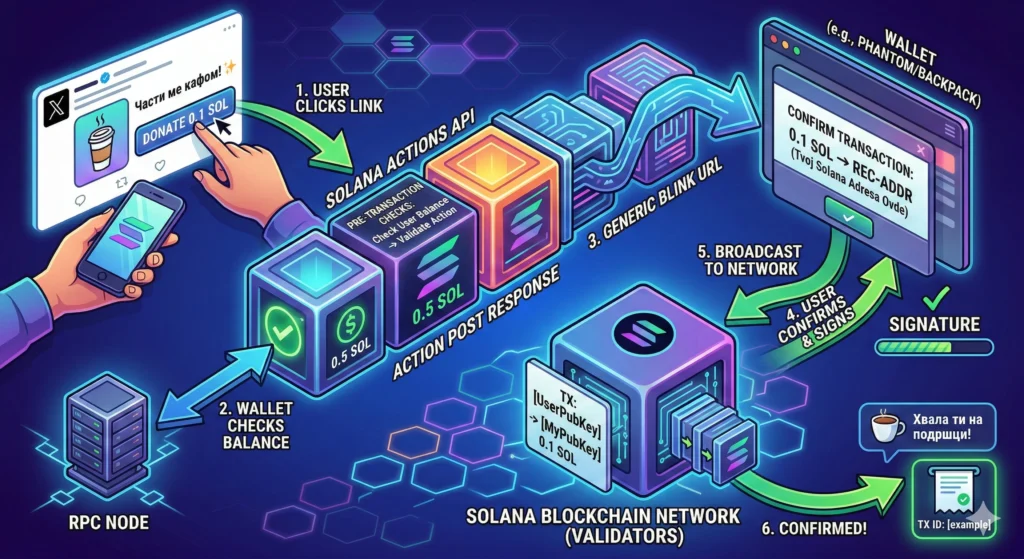
Code Example (TypeScript/Next.js)
Here’s what a simple API endpoint looks like that allows someone to send you a “tip” of 0.1 SOL via a Blink.
TypeScript
import { ActionPostResponse, ACTIONS_CORS_HEADERS, createPostResponse } from "@solana/actions";
import { PublicKey, SystemProgram, Transaction, Connection, LAMPORTS_PER_SOL } from "@solana/web3.js";

// Setting the tip amount
const TIP_AMOUNT_SOL = 0.1;

export const POST = async (req: Request) => {
  const { account } = await req.json();
  const userPubKey = new PublicKey(account);
  const myPubKey = new PublicKey("YOUR_SOLANA_ADDRESS_HERE");

  // Connecting to the Solana network (Mainnet or Devnet)
  const connection = new Connection("https://api.mainnet-beta.solana.com");

  // 🚨 WALLET BALANCE CHECK
  const balance = await connection.getBalance(userPubKey);
  const requiredAmount = TIP_AMOUNT_SOL * LAMPORTS_PER_SOL;

  if (balance < requiredAmount) {
    return new Response(
      JSON.stringify({ message: "Oops! You don't have enough SOL for this coffee. ☕" }),
      { status: 400, headers: ACTIONS_CORS_HEADERS }
    );
  }

  // If everything is okay, proceed with the transaction
  const transaction = new Transaction().add(
    SystemProgram.transfer({
      fromPubkey: userPubKey,
      toPubkey: myPubKey,
      lamports: requiredAmount,
    })
  );

  transaction.feePayer = userPubKey;
  const { blockhash } = await connection.getLatestBlockhash();
  transaction.recentBlockhash = blockhash;

  const payload: ActionPostResponse = await createPostResponse({
    fields: {
      transaction,
      message: `You successfully sent ${TIP_AMOUNT_SOL} SOL! Thank you very much! ✨`,
    },
  });

  return Response.json(payload, { headers: ACTIONS_CORS_HEADERS });
};
Detailed Code Explanation:
**connection.getBalance(userPubKey)**: This function “calls” Solana and returns the wallet balance in Lamports (the smallest unit, 1 SOL = 10^9 Lamports).- Logic condition (
**if**): We check if the balance is less than the required amount. If it is, we returnstatus: 400and a message that the wallet will display to the user. - Optimization: This saves the user time because the transaction won’t even be sent to the network if it’s destined to fail.
Implementation Ideas:
This kind of check is crucial for Ticket Sales (to verify if the user has enough money for a ticket) or for Whitelist checks (where instead of the balance, you check if the wallet owns a specific NFT).